
Guides
Smart contracts
What smart contracts are, how to read them on block explorers, and how they connect to game assets and collections on Web3Raider.
Introduction
When a Web3 game says you own a card, avatar, or land plot, that claim almost always rests on a smart contract: an on-chain program with an address, stored state, and callable functions. The contract enforces who holds which token, how minting works, and often marketplace or reward rules. It does not run the full game loop (matchmaking, combat, graphics).
You do not need to read Solidity to play. You do need chain + address literacy, a habit of checking official sources, and caution with approvals before you mint, list, or claim.
This guide is for players and collectors using Web3Raider. Start with Chains & Layers if network names are new, and Wallets if connecting and signing are new. Token standards and metadata depth live in NFTs.
The sections below walk through what a contract is, how games split on-chain and off-chain work, how to check address and chain, how explorers and approvals work, and how Web3Raider surfaces contracts in the catalog.
What a smart contract actually is
On Ethereum-compatible chains, a smart contract is a special kind of account:
- It has an address (starts with
0x…) like your wallet. - It is not controlled by a private key the way a user wallet is. It runs deterministic code when a transaction hits it.
- Anyone can read public state. Only authorized callers can change state (transfer, mint, pause, and similar).
Ethereum.org: Introduction to smart contracts (opens in new tab) uses a vending machine analogy: the right input (payment + selection) triggers programmed logic that releases the output. No cashier. The rules live in the machine.
In gaming, contracts usually fill a few recurring roles:
Contract role | Typical functions | Player-facing effect |
|---|---|---|
NFT collection |
| Own cards, avatars, land |
Fungible token (ERC-20) |
| Earn or trade in-game currency on-chain |
| Marketplace | list, buy, royalties | Trade assets with other players |
Staking / rewards | stake, claim, distribute | Claim seasonal or tournament payouts |
Rule of thumb: Deploying or upgrading contracts costs gas. Studios often mint and trade on Layer 2 and gaming-focused networks so everyday actions stay affordable. Depth on L1 vs L2 lives in Chains & Layers.
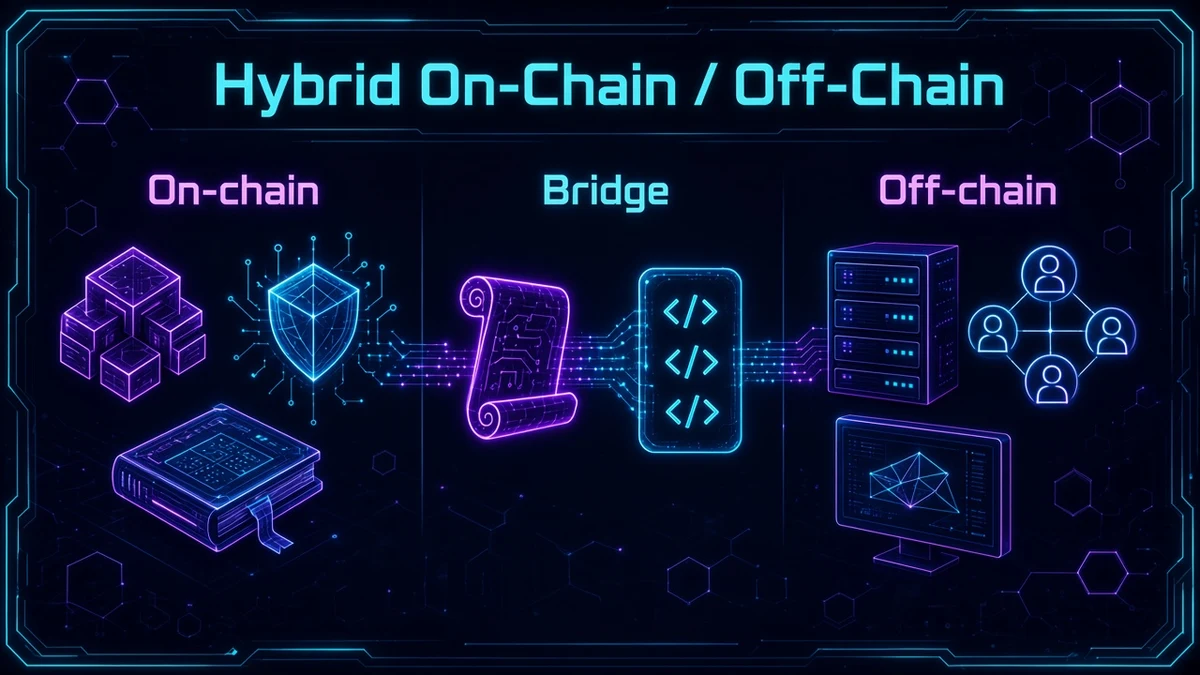
On-chain vs off-chain in Web3 games
Almost no popular blockchain game runs 100% on-chain. Real-time combat, matchmaking, and anti-cheat need fast studio servers. The chain records ownership and economic rules. The servers run gameplay.
On-chain
Smart contract state + transaction history
Who owns token
#42, mint
events, approvals
Off-chain
Game servers, APIs, metadata hosting, match results
Ladder rank, deck validation in a match, card art JSON on IPFS or CDN
Bridge
Wallet signatures, oracles, studio mint APIs
“Claim reward” sends a transaction; the server credits your account after confirmation
Why it matters: Losing access to a game server can lock gameplay, but NFT ownership on the correct contract usually remains in your wallet. A free in-game skin with no on-chain token is not a blockchain asset. You cannot send it to another wallet.
Contract address and chain
Every deployed contract has a unique address on one network. The same brand on Ethereum mainnet and on Base uses different addresses. Always check chain + address together.
Field | What to check |
|---|---|
| Address | 42-character hex string, e.g.
|
| Chain | Ethereum, Base, Immutable zkEVM, Polygon, and similar. Must match your wallet network |
| Source | Official game site, docs, or Web3Raider collection page. Not random DMs |
Browse supported networks on /blockchain. For why a franchise may ship collectibles on L1 and player editions on L2, read Chains & Layers.
When you need explorer or wallet setup depth for a specific chain, open that network’s Guide tab (for example Ethereum, Base, Immutable, or Polygon).
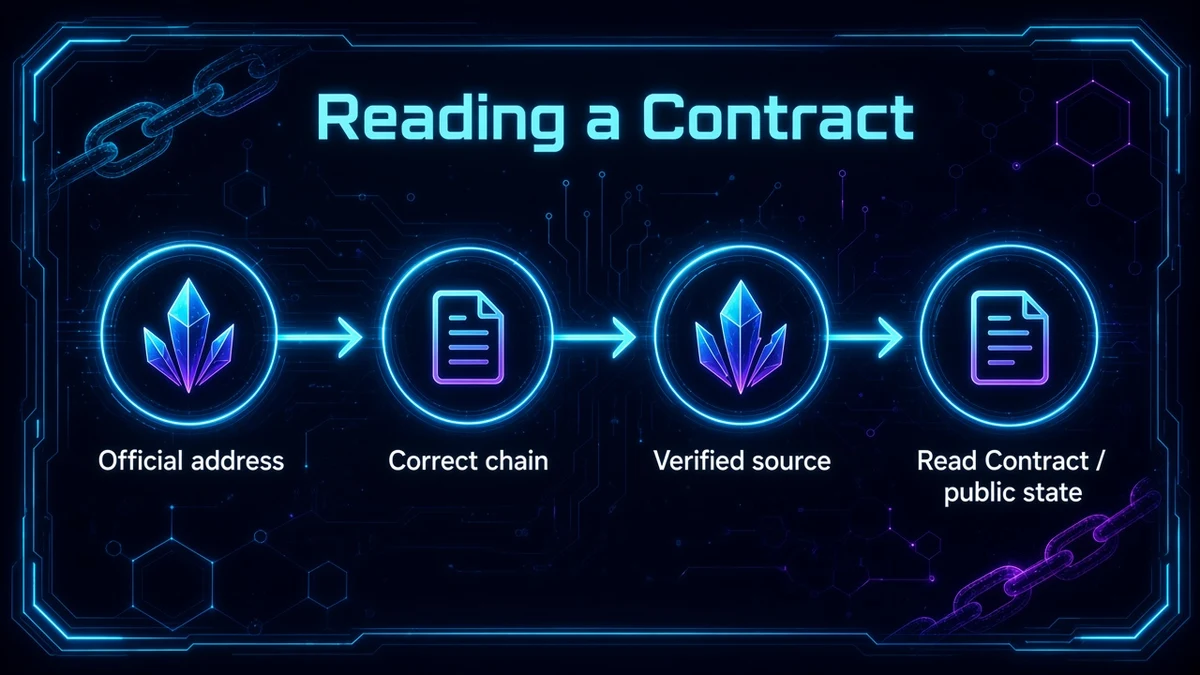
Reading a contract on a block explorer
Explorers such as Etherscan, Immutable Explorer (opens in new tab), Basescan, and Polygonscan let you inspect contracts without trusting a screenshot.
Step by step
- Copy the official contract address from the game docs or a Web3Raider collection page.
- Open the explorer for the correct chain and paste the address.
- Check the Contract tab:
- Verified source code means public, auditable logic (preferred).
- Unverified means bytecode only. Extra caution.
- Use Read Contract to query public state (no wallet needed):
name,symbol,totalSupply,ownerOf,balanceOf,tokenURI. - Write Contract sends transactions. That path needs a connected wallet and gas.
Proxy and upgradeable contracts
Studios sometimes deploy a proxy at a fixed address that delegates logic to an implementation contract they can upgrade later. Players still interact with the proxy address. After verification, the explorer may show Read as Proxy / Write as Proxy (Etherscan proxy guide (opens in new tab)).
Implications for players:
- The address you bookmark can stay the same while logic behind it changes.
- Trust the team and audits, not just a green “verified” badge. Check implementation upgrades on official channels.
Token standards you will see
The standard a collection uses changes how your wallet shows balances and how marketplaces list or transfer items. ERC-721, ERC-1155, and ERC-20 are the labels you will see most often on explorers and collection pages.
Standard | What it represents | Gaming examples |
|---|---|---|
ERC-721 | One owner per token ID | Unique avatars, 1/1 items. See NFTs guide |
ERC-1155 | Many token IDs; balance per ID | TCG card sets, stackable items. See NFTs guide |
ERC-20 | Fungible tokens (divisible balances) | Reward tokens, governance, in-game currencies traded on decentralized exchanges |
One franchise often uses multiple contracts: an ERC-1155 card set, an ERC-721 avatar collection, and a separate ERC-20 reward token, each with its own address.
Transactions, gas, and approvals
Transactions
When you mint, transfer, or claim, your wallet signs a transaction. Validators (on L1) or sequencers (on many L2s) include it in a block; the contract updates state. Confirmed transactions are irreversible. There is no on-chain “undo.”
Gas is the fee paid in the network’s native token (ETH on Ethereum and many L2s, IMX where applicable, and similar). Failed transactions can still consume gas. Layer 2s and gaming-focused chains reduce cost for frequent actions. See Chains & Layers for the player-facing fee picture.
Approvals (critical for safety)
Before a marketplace or third-party contract can move your tokens, you usually grant an approval:
Mechanism | Scope | Common use |
|---|---|---|
approve(spender, tokenId) | One NFT (ERC-721) | Single listing |
setApprovalForAll(operator, true) | All your NFTs in that contract | Marketplace convenience |
approve(spender, amount) | ERC-20 allowance | Swaps, staking |
setApprovalForAll is powerful: if you approve a malicious operator, every NFT in that collection can be taken. Phishing sites often trick users into signing broad approvals or opaque permit messages.
Best practices:
- Approve only known marketplaces linked from official game sites or Web3Raider collection pages.
- Prefer per-token approvals when the UI allows it.
- Revoke unused approvals periodically (wallet security tools or explorer token approval pages).
- Read what your wallet shows before signing, especially EIP-712 typed data (the structured listing or mint message on the confirm screen).
Note: Newer standards such as EIP-6464 (opens in new tab) aim for finer-grained ERC-721 operators and less reliance on blanket
setApprovalForAll. Until they are widely adopted, treat broad approvals as high risk.
Oracles and off-chain data (brief)
Contracts cannot natively fetch arbitrary websites or API scores. They need oracles to bring off-chain data on-chain (Ethereum.org: Oracles (opens in new tab)). In games, oracles or trusted studio servers may feed tournament results, randomness, or price feeds for reward calculations.
As a player, assume gameplay outcomes are validated off-chain unless the project publishes trustless on-chain logic. Ownership of the resulting minted token is still enforced by the contract once issued.
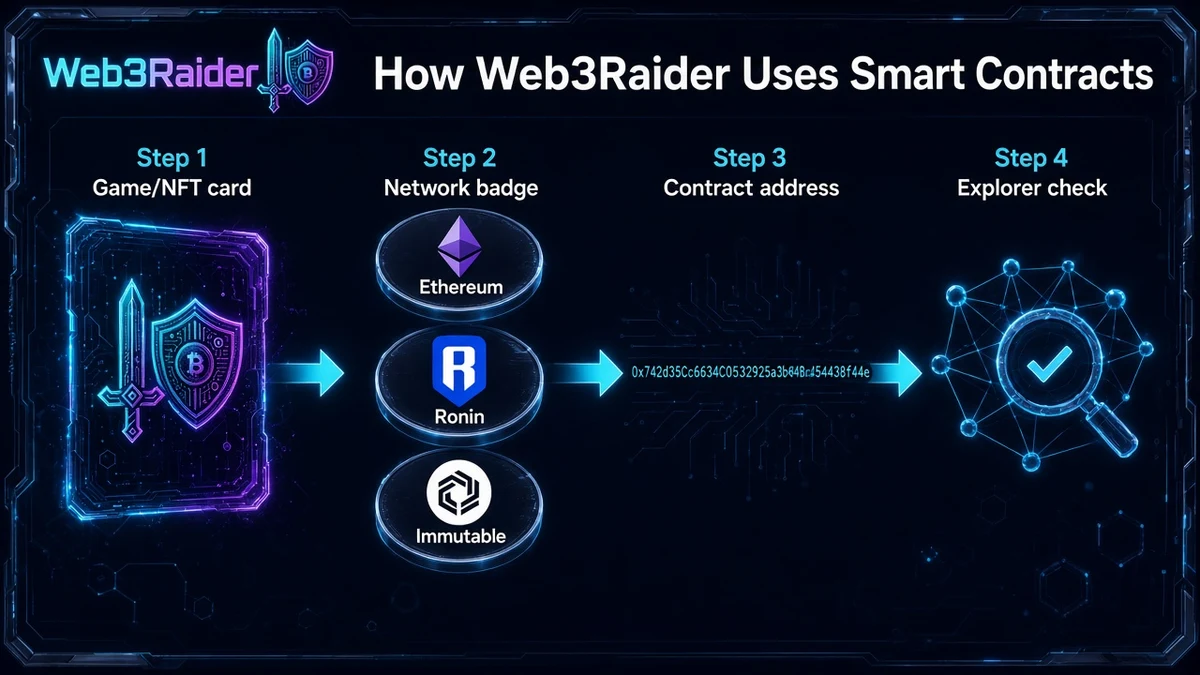
How Web3Raider uses smart contracts
- /nft collection cards and detail pages show network context and marketplace links when configured.
- /games franchise pages point to Collections so you can reach the right contract and chain for that title.
- /blockchain lists networks your wallet must match before you buy or transfer.
- Some Immutable-indexed sets show a contract on the collection page so Web3Raider can load live asset grids. Other collections still show catalog metadata and marketplace links while on-chain listing expands.
Web3Raider is a parallel reference next to official studio docs: use both to check address and chain before you connect a wallet or sign.
Open the collection page for the asset you care about, note the network badge, then match that network in your wallet and on the explorer. When a franchise ships the same brand on two chains, treat each deployment as its own contract and inventory.
Red flags and scams
Unverified contract + “mint now” link
No audit trail. Drainer contracts are common in fake airdrops.
A Discord or X link points to a different contract than the official website.
Wallet on Ethereum while the real collection is on Base or Immutable.
Unlimited approval to unknown spender
Revoke immediately if you signed by mistake. Move remaining assets if compromised.
When in doubt, cross-check two official sources (game website + Web3Raider collection page) before connecting a wallet.
Further reading
- Ethereum.org: Introduction to smart contracts (opens in new tab)
- Ethereum.org: Accounts (opens in new tab)
- Ethereum.org: Oracles (opens in new tab)
- Etherscan: What is a proxy contract? (opens in new tab)
- OpenZeppelin Contracts (opens in new tab)
- Web3Raider: Chains & Layers
- Web3Raider: Wallets
- Web3Raider: NFTs
- Web3Raider: Networks & tokens
Contract addresses, chains, and explorer features change; check critical details on official project documentation before high-value transfers.