
Guides
Wallets
How Web3 gaming wallets work—EOAs, smart wallets, connecting to games, network switching, and staying safe before you sign.
Introduction
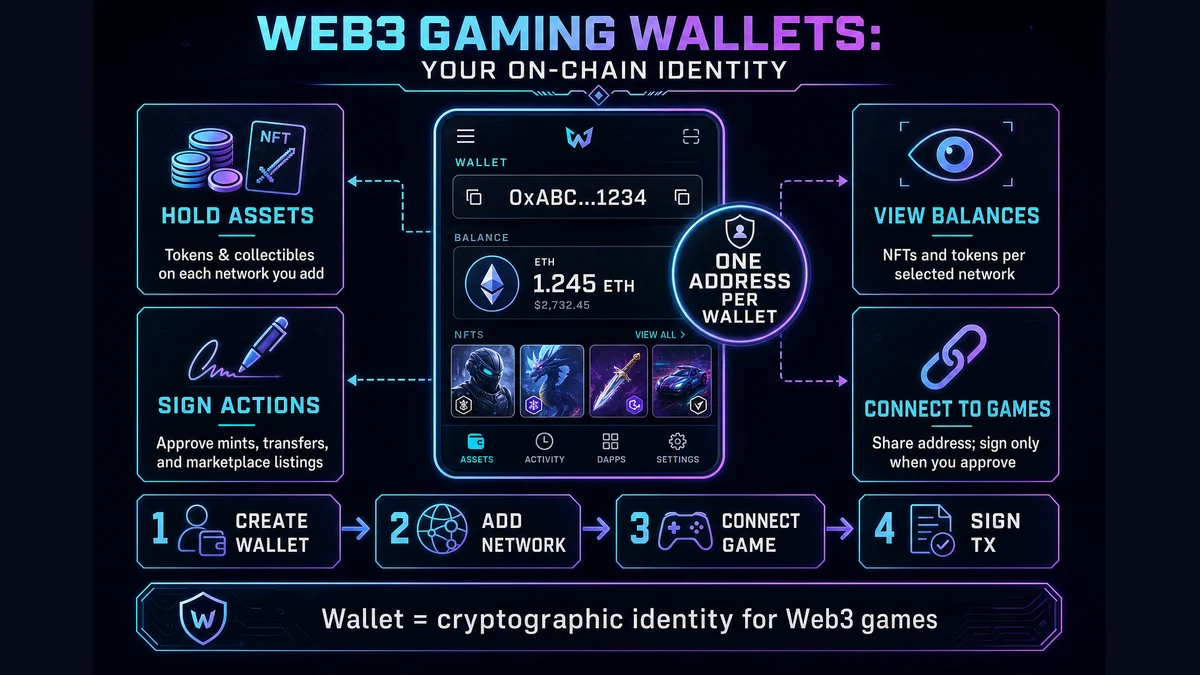
A wallet is how you hold, send, and prove ownership of on-chain assets in Web3 games. It is not just an app icon—it is a cryptographic identity tied to an address (usually starting with 0x… on Ethereum-compatible chains). That address is what games, marketplaces, and explorers use to show your NFTs, tokens, and transaction history.
The same address can hold different assets on different networks. Your wallet on Ethereum and your wallet on Ronin may share the same 0x address, but the NFTs you see depend on which network the game or marketplace is using. If that sounds unfamiliar, read Chains & Layers first.
This guide explains wallet types, how to connect to games, network switching, signing, and basic safety—written for players and collectors on Web3Raider, not for protocol engineers.
Reading order on Web3Raider:
- Chains & Layers — where assets live
- Wallets (this guide) — how you connect and sign
- Smart contracts — what runs on that network
- NFTs — how tokens and metadata are represented
What a wallet actually is
At a high level, your wallet gives you:
- An address others use to send you assets or verify ownership
- A way to sign transactions and messages (approve mints, list NFTs, claim rewards)
- A view of balances and NFTs on the networks you have added
Term | Plain meaning |
|---|---|
| Address | Your public on-chain ID (e.g.
|
| Private key | Secret that proves you control the address—never share it |
| Seed phrase | 12–24 words that can restore your wallet on a new device |
| Connect | A game or site asks your wallet to link your address (read-only until you sign) |
| Sign | Approve a specific action—transfer, mint, listing, or permission |
Rule of thumb: Your wallet shows what you own on the network you have selected. Wrong network = empty balance, even if the explorer shows the asset elsewhere.
Wallet types in Web3 gaming
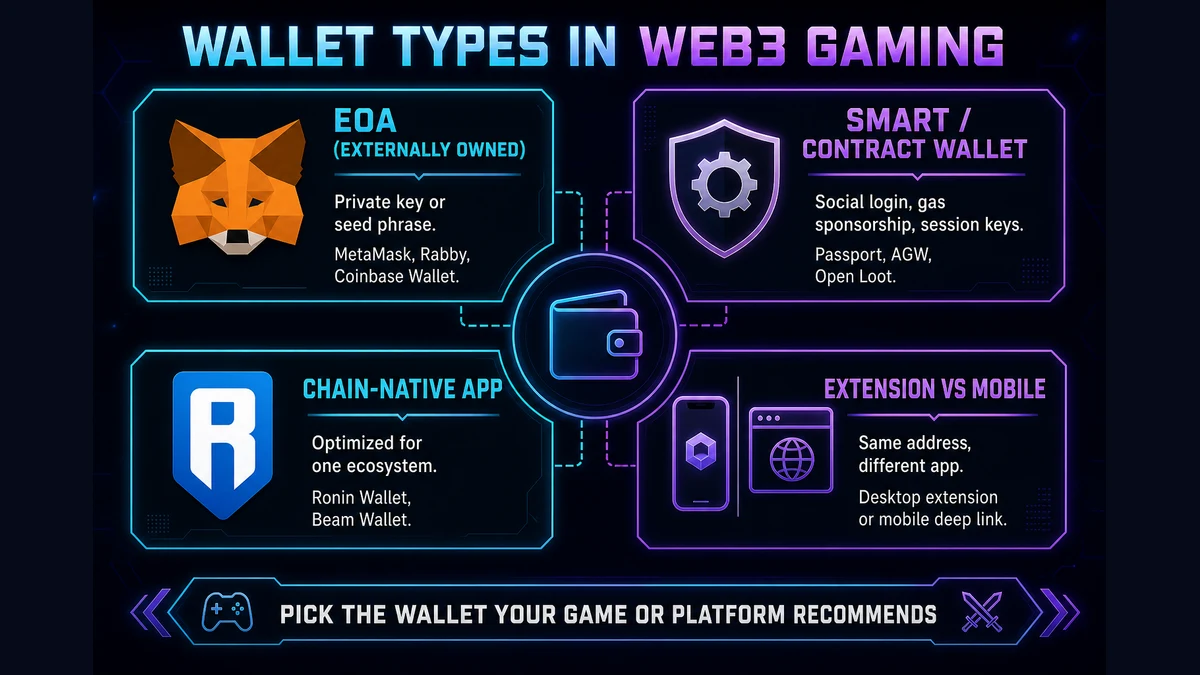
Games and hubs use different wallet models. The labels below are what you will see on Web3Raider platform pages and in official docs.
Type | How it works | Examples in gaming |
|---|---|---|
EOA (externally owned account) | Classic wallet controlled by a private key or seed phrase; you pay gas in the network's native token unless a dapp sponsors it | MetaMask, Rabby, Coinbase Wallet |
Smart / contract wallet | On-chain account with programmable rules—social recovery, session keys, sponsored gas, batched actions | Immutable Passport, Abstract Global Wallet, Open Loot embedded wallet |
Chain-native app wallet | Wallet tied to a gaming chain or hub; often optimized for that ecosystem's games and marketplaces | Ronin Wallet, Beam Wallet |
Browser extension vs mobile | Same address type, different app—extensions for desktop browsers; mobile apps via deep link or WalletConnect | MetaMask extension; Ronin mobile app |
Custodial vs non-custodial
- Non-custodial: You hold the keys (or device-bound keys). The provider cannot move funds without your signature. Most gaming wallets marketed as “your wallet” are non-custodial, including Passport and Ronin Wallet.
- Custodial: A company holds assets on your behalf (exchange account). Fine for trading on a CEX, but not the same as owning an on-chain NFT in your own wallet.
Account abstraction (2025+)
Many new gaming wallets use smart account features—gasless play, fewer popups, email or social login—while keeping the same address for marketplaces. Ethereum's Pectra upgrade (2025) also lets classic EOAs opt into similar UX via EIP-7702. You do not need to understand the standards; just know that "Connect with Passport" may feel different from "Connect MetaMask" even though both end up on-chain.
Keys, seed phrases, and recovery
EOA wallets (MetaMask, Rabby, etc.) usually give you a seed phrase when you create a wallet. Anyone with that phrase controls every asset in that wallet, on every chain. Store it offline; never type it into a website, Discord bot, or “support” form.
Smart and embedded wallets (Passport, Ronin social login, Abstract AGW) often use email, social, or passkey flows instead of showing a seed phrase on day one. Recovery is handled through the provider's account system plus on-chain guardian policies. You still own assets non-custodially in most gaming setups—but you depend on that provider's recovery flow if you lose access.
- Use official wallet apps and bookmark official game URLs
- Export or back up seed phrases only on paper or a hardware backup
- Use a separate wallet for experiments vs long-term collectibles
- Share seed phrases, private keys, or “sync” QR codes with anyone
- Sign messages on sites you reached from random DMs or ads
- Assume “Connect wallet” means the site can take funds without another signature
Connecting to a game
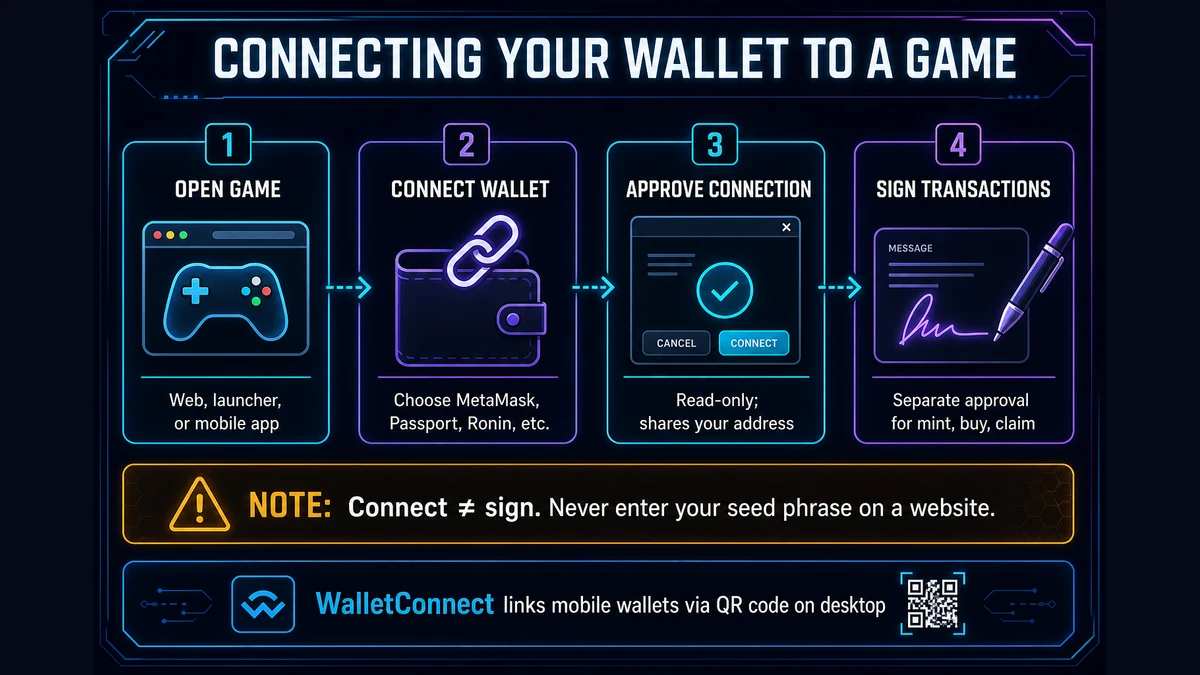
Most Web3 games ask you to connect a wallet before minting, trading, or syncing inventory. The flow is similar across products:
- Open the game (browser, launcher, or mobile app)
- Click Connect wallet or Sign in
- Choose a provider (MetaMask, Immutable Passport, Ronin Wallet, WalletConnect, etc.)
- Approve the connection request in the wallet UI (this is usually read-only)
- When you buy, mint, or claim, approve transactions or typed signatures separately
Common connection methods
Method | Best for |
|---|---|
Browser extension | Desktop web games; MetaMask or Rabby injected into the page |
| WalletConnect | Linking a mobile wallet to a desktop browser via QR code |
Embedded / iframe wallet | In-game Passport, AGW, or hub login without installing an extension |
| Mobile app deep link | Ronin Wallet, Coinbase Wallet, or chain-specific apps opening from the game |
Note: Connecting only shares your address. Moving assets still requires explicit signatures. If a site asks for your seed phrase to “connect,” it is a scam.
Choosing the right network
The most common beginner mistake is owning an asset on chain A while the wallet UI is set to chain B.
Symptom: “I see the NFT on the explorer but my wallet is empty.”
Fix:
- Confirm which network the collection uses (game docs, Web3Raider collection page, or block explorer URL)
- In MetaMask or Rabby, switch network to match—or use the game's built-in wallet (Immutable Passport on Immutable, Ronin Wallet on Ronin)
- Re-open the game or marketplace and reconnect
See Chains & Layers for how L1, L2, and gaming chains differ. For per-chain RPC and wallet setup, use the Guide tab on the relevant network hub—for example Ethereum, Immutable, Ronin, or Base.
Signing transactions
When you mint, transfer, claim, or list an NFT, your wallet asks you to sign. That signature authorizes a transaction or a structured message (often EIP-712 for marketplaces).
- Gas: On most networks you pay a small fee in the native token (ETH, RON, etc.). Gaming smart wallets and some hubs sponsor gas so players are not blocked for lacking ETH.
- Session keys: Some games request limited permissions for a play session so you are not prompted on every action. Revoke old sessions in wallet security settings when you stop playing.
- Irreversibility: Confirmed on-chain transfers cannot be undone. Read the wallet popup before approving.
For contract-level detail (approvals, setApprovalForAll, explorers), continue to Smart contracts.
Approvals and permissions
Before a marketplace or third-party contract can move your tokens, you usually grant an approval. That is separate from simply connecting your wallet.
- Token approval: Allow one contract to spend a specific amount of an ERC-20 token
- NFT approval: Allow a marketplace to transfer one NFT, or setApprovalForAll for an entire collection
Broad approvals are convenient but risky if you approve a malicious site. Prefer limited approvals when possible, and revoke unused ones. Full explanation: Smart contracts — Transactions, gas, and approvals.
Gaming wallets vs general-purpose wallets
| Situation | Prefer |
|---|---|
| Playing Immutable ecosystem titles | Immutable Passport (gas sponsorship, cross-game identity) |
| Pixels, Stacked rewards, Ronin games | Ronin Wallet |
| Beam network games | Beam Wallet |
| Abstract Portal and Pudgy ecosystem apps | Abstract Global Wallet |
| Trading on OpenSea across many EVM chains | MetaMask or Rabby with correct network added |
| Multi-chain collector portfolio | General-purpose EOA + network guides per chain |
You can use both: Passport in-game for daily play and MetaMask for secondary sales— as long as you understand which address holds which assets on which chain.
Platform guides on Web3Raider
Immutable Play — Passport onboarding
Stacked — Ronin Wallet and rewards cash-out
Beam — Beam Wallet for Beam network games
Open Loot — embedded wallet and publishing stack
Using Web3Raider
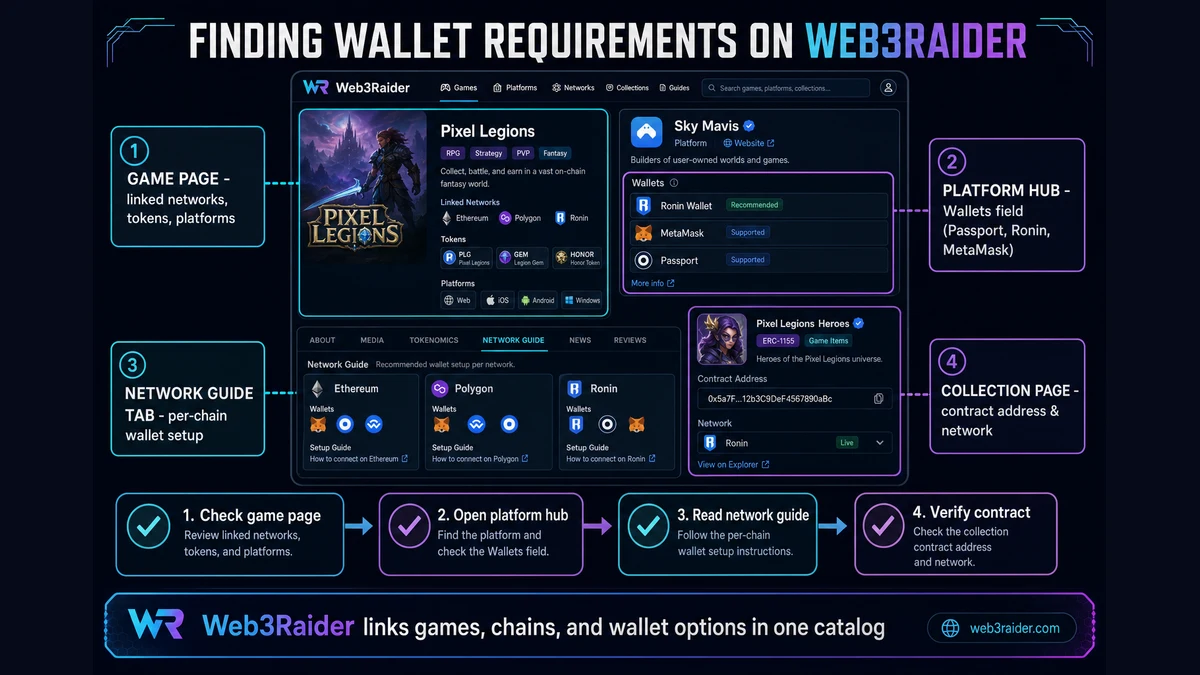
Web3Raider links games, networks, platforms, and collections so you can see which wallet and chain a title expects before you install anything.
- Game page — check linked networks, tokens, and platforms
- Platform hub (
/platforms) — Wallets field lists supported options (Passport, Ronin Wallet, MetaMask, etc.) - Network hub (
/blockchain) — Guide tab covers per-chain wallet setup and explorers - Collection page — contract address and network for verifying ownership
Safety checklist
Before you connect or sign:
- URL — official domain from studio docs or Web3Raider links, not look-alike typos
- Network — wallet network matches the game or marketplace
- Contract — collection address matches official announcements (see Smart contracts)
- Approval scope — avoid unlimited NFT approvals to unknown spenders
- Seed phrase — never enter it on a website; legitimate support will never ask
- Separate wallets — consider a “hot” wallet for new mints and a “vault” for valuable collectibles
Further reading
- Ethereum.org — Wallets (opens in new tab)
- Ethereum.org — What is a wallet? (opens in new tab)
- WalletConnect — How it works (opens in new tab)
- Web3Raider — Chains & Layers
- Web3Raider — Smart contracts
- Web3Raider — NFTs
- Web3Raider — Platforms
- Web3Raider — Networks & tokens
Last updated: June 2026. Wallet products, chain merges, and account-abstraction features evolve quickly; confirm setup steps on official project documentation before high-value transfers.